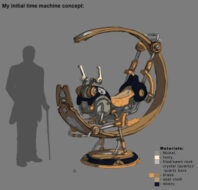
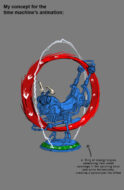
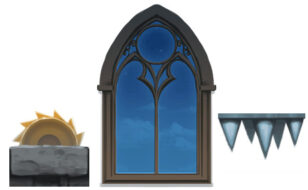
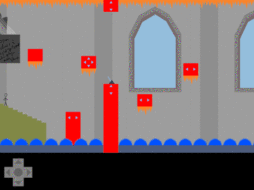
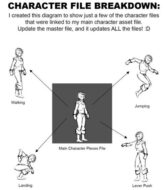
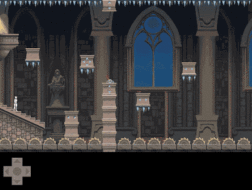
[{"content":{"text":"Hey, my name is Zach Coe, an Advanced Concept Artist here at Schell Games. Over the past 8 years, I\u2019ve worked on various projects, concepting, texturing, and illustrating for environments, user interfaces, characters, vehicles, mini games, you name it. Whatever is needed.<\/p>So recently I wanted to focus on learning how to use Photoshop\u2019s Timeline animation tool. Sure I\u2019ve used the Frame animation tool countless times in my concept art, but the Timeline tool has always scared me. It\u2019s overwhelming, and unwieldy, and has lots and lots of buttons (I always worried I\u2019d create a rift in Earth\u2019s timeline if I used it wrong). But I decided I was going to jump in with both feet and learn the mysteries of this tool in one<\/em> week.<\/p>Now I am in no way an animator, and you may be asking, \u201cWhy would a Concept Artist use animation tools?\u201d Over the years I\u2019ve found that complex concepts need much more than just a single still image to communicate the complete idea to the team. And I have found that even the roughest animation can take a drawing that has lots of parts and pieces and quickly show how it would move and work within a level.<\/p>When concepting anything, say a prop, an environment, a character, etc, you want to make sure everyone can understand your idea. Not just your basic idea of \u201cI think this would look cool\u201d, but your idea of how it works, why it works, how it moves. Sometimes you can do a drawing or two, talk to the modelers, animators and programmers, and the idea is communicated just fine.<\/p>Sometimes though, there\u2019s more to it than that. Sometimes your idea is so specific and detailed that a rough animation is vital<\/em> to help the team see how the concept\u2019s intricate components work together.<\/p>So for me, I will occasionally do an animated piece of concept art to present alongside my drawing\/painting. For instance, below is a time machine I concepted for our iOS game \u201cThe World of Lexica<\/a>.\u201d I came up with this futurey motorcycle\/grasshopper looking machine, and my initial drawing is focused on defining the look<\/em> of the machine.<\/p>"},"id":"7ee8caf3-b4e8-416a-826e-6087f1670ca2","isHidden":false,"type":"textBlock"},{"content":{"location":"kirby","image":["file:\/\/qqmcR53jExIUVQd4"],"src":"","alt":"","caption":"","link":"","ratio":"","crop":"false"},"id":"47ce69d4-84dc-4747-90a0-3d62543edc3e","isHidden":false,"type":"imageBlock"},{"content":{"text":"But once I had the look down, I wanted to show more accurately how I designed the parts to move. This key information is just as much part of the concept as how the machine looks. It helps the team understand its function and how it needs to be built in 3D to achieve this. So I also made this animated concept:<\/p>"},"id":"abda6dd3-a95a-4f24-aed6-0276e3354c96","isHidden":false,"type":"textBlock"},{"content":{"location":"kirby","image":["file:\/\/GN6a9HDRpXuKiBj8"],"src":"","alt":"","caption":"","link":"","ratio":"","crop":"false"},"id":"457beefc-4af1-467c-84ba-87cb036dd99c","isHidden":false,"type":"imageBlock"},{"content":{"text":"Since the Frame Animation tool has always been so invaluable to me in creating concepts like the image above, I wanted to see how the Timeline tool could help me. Would it make my concept animation easier?<\/p>MY OBJECTIVE<\/strong>In order to better communicate the concepts that require movement, I wanted to see if it would be beneficial to learn how to create more complex animation samples using Photoshop\u2019s Timeline animation tool. My goal was to visually show how some of the more complex concepts I\u2019m trying to communicate would work\/animate in game.___________________________________________<\/p>WHAT I LEARNED<\/strong>After much trial and error:1. This tool is best used for multiple repetitive background animations<\/strong>, like these:<\/p>"},"id":"d8e65457-289f-42fc-a891-0bfe4df8400e","isHidden":false,"type":"textBlock"},{"content":{"location":"kirby","image":["file:\/\/uxZR2biPJTpXX4hc"],"src":"","alt":"","caption":"","link":"","ratio":"","crop":"false"},"id":"2f2f4002-7799-475b-862e-07c4cb828218","isHidden":false,"type":"imageBlock"},{"content":{"text":"2. Then use the Frame by Frame tool for any character work<\/strong> overtop of the background, because it is NOT good for specific precise movement animations, like when you need a character jumping around in an environment.<\/p>3. NEVER use it for both<\/strong>, ever<\/em> \u2026 lesson learned.___________________________________________TIP: USING SMART OBJECTS WAS INCREDIBLY ADVANTAGEOUS<\/strong>I knew a lot of time would be spent toward the animation end and I might not have much time to art things up (as it turns out I only had a day and a half to do the art), so I set everything up in the beginning as Smart Objects. This took a little longer in the initial setup of the level, but it made my job worlds easier, as well as saving me tons of time, later on in the week.<\/p>I started it like a 3D project, with a \u201cwhiteboxing\u201d mentality of keeping everything as simple replaceable objects for the initial setup. This way, once I had my animations in place, the only assets I had to update\/change were my master Smart Object files in order to update all of my art in the animations.<\/p>For example, you can see the \u201cWhiteboxed\u201d base animation from Day 1 below:<\/p>"},"id":"582a2285-efe5-4332-8498-bdeca6cb368c","isHidden":false,"type":"textBlock"},{"content":{"location":"kirby","image":["file:\/\/AVTK8CvDbRUl1KRd"],"src":"","alt":"","caption":"","link":"","ratio":"","crop":"false"},"id":"2176935f-3abe-4993-81c9-1552f8624a85","isHidden":false,"type":"imageBlock"},{"content":{"text":"As you\u2019ll notice, there\u2019s no pretty art to look at, few parts are actually animating, and one of the assets even has notes to myself scribbled on it. But this early on, because I made it easy on myself with the initial setup, I could just focus on my Timeline animation education, pure and simple.<\/p>In addition to this, I was able to use a similar thing to Smart Objects that I\u2019d never tried before: externally linked files. Photoshop now lets you create a master photoshop file, and then reference that file from within other<\/em> Photoshop files! o_O I know, amazing<\/em>, right? Because of that, I was able to set up quick animations for my character, even starting it as a simple stick figure like in the video above, and then anytime I changed something on my character in the master file I could simply update my animations with the updated master art - see my chart breakdown below:<\/p>"},"id":"e53a26c0-8d9f-49fc-bd96-559d0642d8cc","isHidden":false,"type":"textBlock"},{"content":{"location":"kirby","image":["file:\/\/bOmD9wGW4sOAEYq0"],"src":"","alt":"","caption":"","link":"","ratio":"","crop":"false"},"id":"bda634bb-6bba-4414-b5be-2ac7e18689d4","isHidden":false,"type":"imageBlock"},{"content":{"text":"Wow \u2026 that\u2019s a lot of files, but they all worked together great. :P___________________________________________DISADVANTAGES & SETBACKS<\/strong><\/p>-THE TIMELINE TOOL IS HORRIBLE FOR DOING CHARACTER ANIMATION<\/strong>What I found is that it\u2019s great for letting you show a bunch of little animations at once in a single scene without having to coordinate them frame by frame, like all of the saw blades, shiny spikes, clouds in the window, etc. What it\u2019s NOT great for is moving a character around to precise points and reusing animations.<\/p>For instance, in order to re-use my jump animation, I had to make a copy of my \u201cjump\u201d smart object layer for every single time my character needed to jump. This type of task becomes a time-consuming PAINSTAKING process, and is better reserved for the frame by frame animation tool where you can easily re-use the same jump animation layers over and over.<\/p>-BEWARE THE DREADED PHOTOSHOP SAVE FOR WEB<\/em> GLITCH<\/strong>On top of the character animation issue above, I won the coveted \u201cI BROKE PHOTOSHOP<\/em>\u201d award! When your animation gets too long with the Timeline Tool, Photoshop playback is super chuggy, but I need to see my animation in real-time, so I constantly have to export an updated gif to see my progress. However, by my millionth gif export on Wednesday afternoon, Photoshop\u2019s \u201cSave For Web\u201d function broke on me. Completely. Apparently from my research there are 2 ways to fix it:1. Delete your \u201cSave for web\u201d prefs (this didn\u2019t work)2. Reinstall Photoshop (even then it would break again)Neither of these solutions worked. :(<\/p>MY BACKDOOR SOLUTION<\/strong>(There may be better ones. This is what I came up with on the fly.)<\/p>Since I also couldn\u2019t view the animation in real-time directly in Photoshop, I absolutely had to have an exporting option, so I resorted to exporting several times a day as a Quicktime video. This took longer than \u201cSave for Web\u201d, but at least it allowed me to see my progress.<\/p>Because of this breakage, I had to get a screen capture of my exported video to show here. Check it out below:<\/p>SCREEN CAPTURE OF MY EXPORTED VIDEO<\/strong><\/p>"},"id":"a5e9d7fd-7c2d-4985-b1d1-0bedf1518cec","isHidden":false,"type":"textBlock"},{"content":{"location":"kirby","image":["file:\/\/67nVzZ16J96FPlnc"],"src":"","alt":"","caption":"","link":"","ratio":"","crop":"false"},"id":"e54aeea8-e083-4872-8cf7-b2d5e1563547","isHidden":false,"type":"imageBlock"},{"content":{"text":"CONCLUSION<\/strong>So all told, I did learn a lot, and about more than I was expecting. It was definitely a fun challenge, and I\u2019m really glad I tried it! I pushed myself to learn something new, and came out with some great tips and tricks to use in future work.<\/p>And though I wouldn\u2019t use the Timeline Tool in this particular way again, I do know more about it now and am well versed on some things it is<\/em> useful for (as well as the awesome power of Smart Objects and Externally linked PSDs) and hopefully this will help someone else out there or in the studio here as well.<\/p>For more concept work visit my website<\/a>, or follow me on Facebook<\/a>, Instagram<\/a>, and Artstation<\/a>.<\/p>"},"id":"e4a56ff3-2d68-4098-9e3e-e64ed6609e05","isHidden":false,"type":"textBlock"}]